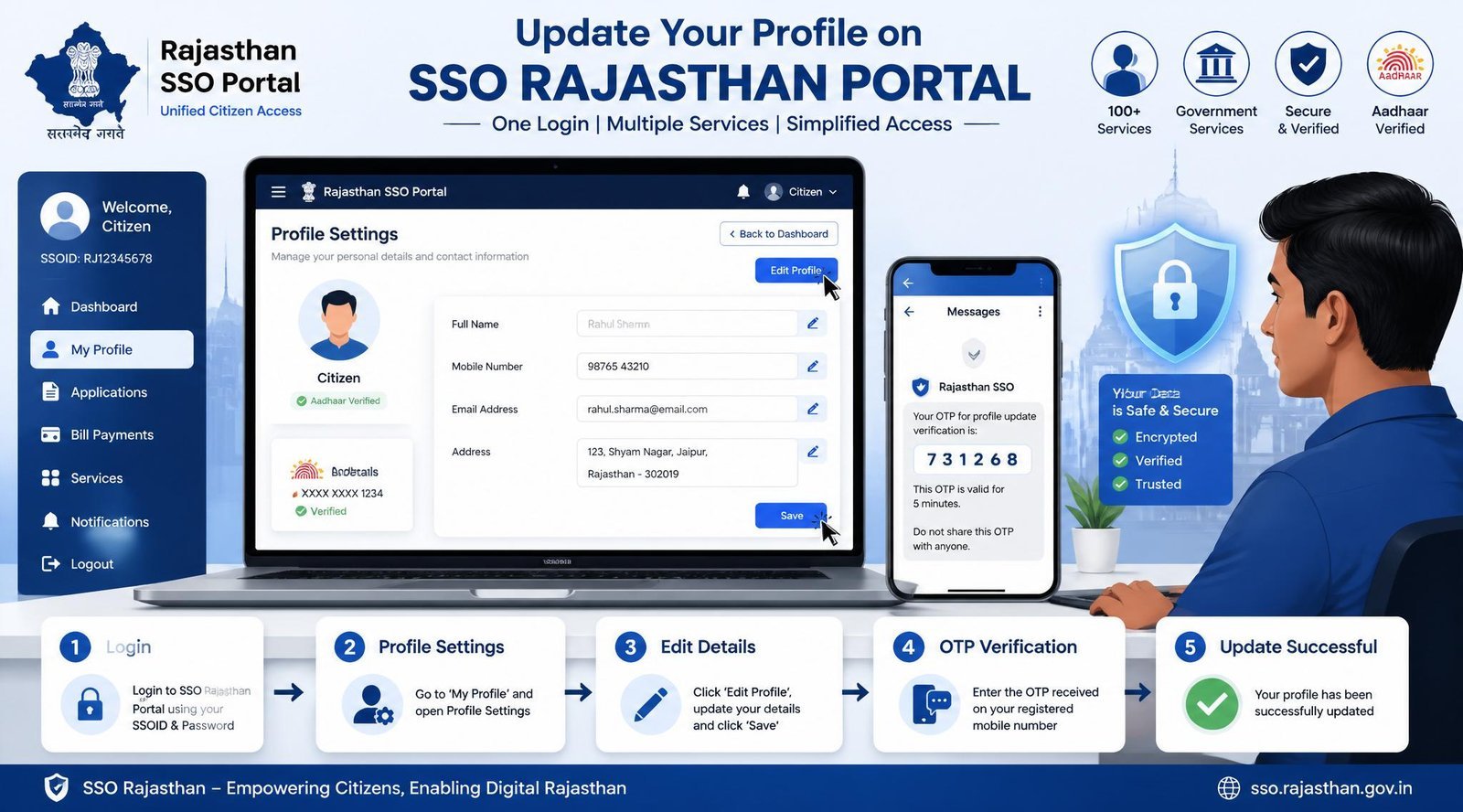
The Rajasthan Single Sign-On (SSO) portal serves as a digital gateway for citizens to access a myriad of state services with a single login. Whether you're a government employee, a student, or a resident availing public services, ensuring that your profile information is up-to-date is crucial. In this guide, we'll walk you through the process of updating your profile details in the SSO Portal Rajasthan, ensuring a smooth and hassle-free experience.
Why Updating Your Profile in the SSO Portal Rajasthan Matters
Keeping your profile updated on the SSO portal is more than just an administrative task. It ensures seamless access to various government services and prevents any potential issues related to outdated information. Accurate profile details are essential for identity verification, service eligibility, and receiving important notifications from the Rajasthan government.
Step-by-Step Guide to Update Profile Details
Accessing the SSO Portal
To begin updating your profile details, first access the SSO Portal Rajasthan. Use the following steps:
- Open your web browser and navigate to the official SSO Portal Rajasthan.
- Log in using your SSO ID and password. If you have forgotten your login details, the portal provides an option to recover them through your registered email or phone number.
Navigating to Profile Settings
Once logged in, follow these instructions to reach the profile settings:
- On the dashboard, locate the "Profile" section, typically found in the top menu or side navigation.
- Click on "Profile Settings" to view your current details.
Editing Personal Information
After accessing your profile settings, update your information as needed:
- Name: Ensure your full name is spelled correctly.
- Contact Information: Update your phone number and email address to ensure you receive all notifications.
- Address: Verify and update your residential address for accurate service delivery.
Saving Changes
After making the necessary updates, save your changes:
- Click on the "Save" button to submit your updated information.
- You may be prompted to verify changes via an OTP sent to your registered mobile number or email.
- Ensure you receive a confirmation message indicating successful update of your profile details.
Common Issues and Solutions
Login Problems
If you encounter difficulties logging into the portal, ensure you are using the correct SSO ID and password. Use the "Forgot Password" feature if needed.
Error Messages
During the update process, you might receive error messages. These can often be resolved by checking for mandatory fields that are left blank or ensuring the format of your entries matches the required specifications.
Profile Not Saving
If your profile details aren't saving, try refreshing the page and re-entering the information. Persistent issues may require contacting SSO support through their help and support section.
FAQs
- Why can't I see the option to update my profile details?
Ensure you are logged into the correct account and that your user role permits profile updates. If the issue persists, contact SSO support. - What should I do if I encounter an error during the update?
Check for any missed mandatory fields or incorrect formats. Clearing your browser cache or using a different browser can also help resolve the issue. - How long does it take for changes to reflect in the SSO portal?
Changes are typically reflected immediately, but in some cases, it might take up to 24 hours for the updates to sync across all connected services. - Can I update my profile details on the SSO mobile app?
Yes, the SSO mobile app provides a similar interface for updating profile details. Ensure you have the latest version of the app for the best experience.
Final Thoughts
Regularly updating your profile details on the SSO Portal Rajasthan is essential for uninterrupted access to government services and communications. Should you encounter any problems, the portal's support team is readily available to assist you. Always verify your updated information to ensure accuracy and prevent service disruptions. For further assistance, explore the help and support section of the SSO portal.